for Retail and Restaurant

HP HR2150 Solteq Commerce Cloud POS Configuration for Simple COM

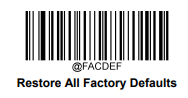
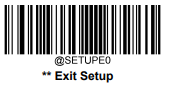
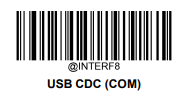
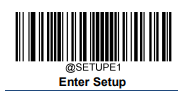
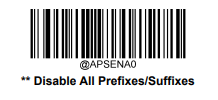
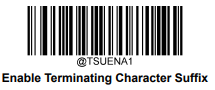
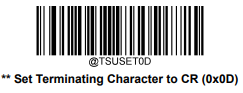
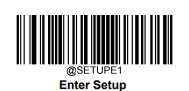
All codes must be read in the correct order.

  1. Reset scanner to factory default settings.
    worddav96a3ca38ddac4104be3fb1253f03fdcd.png
    worddav4fb8e0ea0861ffc48a70d72383d0477e.png
    worddavc64bf2aee039144a6a85dcbcb1a9415b.png
  2. Enable COM interface.

    worddav5f0767e8b792504aa86b04de71a7259b.png
  3. Set the correct prefix and suffix.
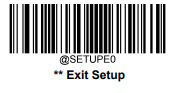
    worddav3cf2e87e8c46b5f03a76d5065f86629a.png
    worddavcfe073661c59f2036e8c2af38b7cea00.png
    worddav952070bd9154831d14fc93bd398398ea.png
    worddavd1eabe5fccf41d2ab8c11a765ae9852c.png
    worddavc2dcd751d26c3a2f58915c438503a826.png