
Transaction orders are created in the Stock view of the Back Office. The following types of transaction orders can be created:
|
Transaction Type |
Reason Codes |
Description |
|---|---|---|
|
Stock In |
Purchase |
For purchasing products |
|
For other Stock in transactions |
||
|
Stock Out |
Transfer |
For transferring products from one stock to another. |
|
Loss |
For decreasing balance for stock products. |
|
|
For other stock out transactions |
||
|
Missing |
Can be automatically generated to subtract the missing quantity from the Stoc; see Handling Differences in Expected and Received Quantities. |
If a user has the permission to Modify a certain Stock, the user can transfer products from it also to Stocks which the user has no permissions to modify.
Sort and/or Filter the Transaction Orders View
The view contains the following information about the transaction orders made in the Stock:
-
Name
-
Comment (if any)
-
Last update
-
Reason for the transfer
-
Status of the transaction:
-
Pending
-
Done
-
Incomplete
-
You can use the above criteria for sorting the information in the Transaction Orders view:
-
The arrow icon next to the column header (A.) indicates that the column is used as the sorting criteria. Click on the arrow icon to sort the information in either ascending or descending order.
-
To select another column header to be used as the sorting criteria, click on the column (B.).
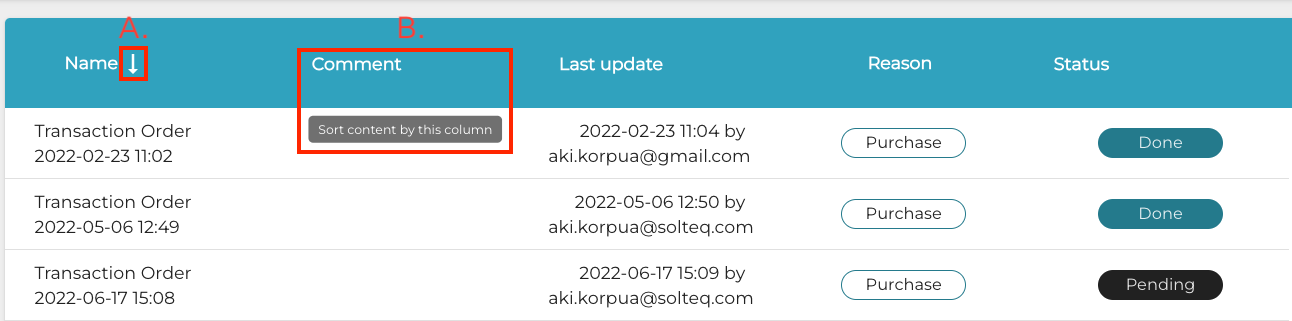
You can also use sorting in the Products section of an individual transaction order; products can be sorted using Name, Group, Supplier, Purchase price, In stock, Expected quantity, Received quantity and Value as sorting criteria.

The following filters can be used to filter the information in the Transaction Orders view:
-
Status: Select Pending, Done or Incomplete.
-
Transaction Type: Select the transaction type(s)
-
Transaction time: Select the date range.
-
Reason Code: Select the reason code(s)
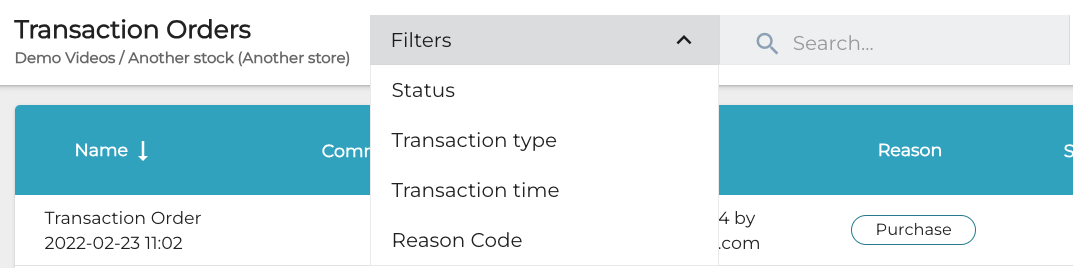
When you have selected the filters you want to use, click Apply filters to filter the information.
-
Creating Purchase Orders -
Transferring Products from One Stock to Another -
Creating Loss of Stock with a Transaction Order -
Importing Purchase Order Data with Excel -
Custom Reason Codes for Stock In/Out Transactions -
Creating Orders for Variant Products -
Adding Products with Embedded Weight in the Barcode to a Purchase Order